That said it is good to see continuing progress.
Wednesday, July 8, 2009
RVTools #8 version 2.5.5
There's a new version of RVTools, v2.5.5. Mostly bugfixes and small incremental changes.

Migrating Virtual Center Server DB from MSDE to SQL Server
SQL Server Express has a DB size limit of 4GB. I discovered that on a Monday morning! Our DB had reached that size. The shrink function didn't! Checking the tables the two event tables were the big problem.
There is an interesting query on the VMware support site which suggests that VMware do not support this migration, but prefer rebuilding the db from scratch, i.e. re-installing. However, talking to VMware support on the following day, Tuesday, they were only too happy to follow a procedure to migrate the DB from Express to full SQL Server. In fact I would say they preferred to do that compared to simply telling me how to purge the event tables. Although that would have been the option had full SQL Server not been an option and the tech support were prepared to go that way.
I googled an article on a site I'd never heard of previously. Talking with VMware support it was pretty good, but missed a number of steps out. I'll try and fill those blanks in in blue below.
1. Shutdown the Virtual Center server, so it discontects from the MSDE database.
I didn't have a choice. The database was so full, VCS wouldn't run.
2. At a command prompt, enter:
c:\sqlcmd -S \SQLEXP_VIM
1> Use master
2> Exec sp_detach_db VIM_VCDB
3> go
Alternatively, load the SQL Server management Studio Express, and detach the DB using the menu option.
3. Copy the database files (vim_vcdb.mdf, vim_vcdb.ldf, vim_umdb.mdf, vim_umdb.ldf_ to the appropriate data directory on the targetSQL Server.
4. Open Microsoft SQL Server management Studio on the target server.
5. Check that the SQL Server properties are to allow both Windows & SQL Server authentication.
6. Select Security->Logins to create a SQL user account, e.g. vclogin
7. Right click Databases and then Attach Database
8. Assign vclogin account database owner roles for vim_vcdb.mdf, vim_umdb.mdf and msdb databases. Leave the default database as master for vclogin SQL account.
9. On the VC Server, change the existing "VMware VirtualCenter" ODBC connection from the local MSDE "\SQLEXP_VIM" to SQL001
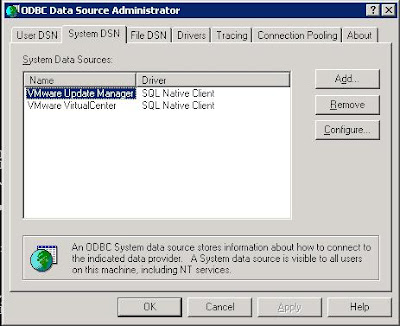
10. Choose the SQL server account authentication method, and input the vclogin username/password combination.
10. The procedure states to run Add/Remove Programs and repair the installation, but VMware support provided an alternative procedure, essentially using regedit to change the details in the registry.
11. Program->Run->Regedit
12. Fields 2 & 3 will be empty to begin with.
13. Add the username created in field 2.
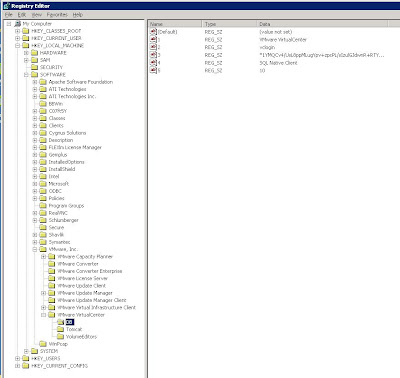
14. To enter the password into field 3, enter
vpxd -p

15. Log back in VirtualCenter and verify the configuration.
16. Ensure that SQL Agent service is running on the server.
17. Register performance monitoring scripts on new server as vclogin via the SQL Server Management Studio, You'll find the scripts in the Virtual Center Server directory.
job_schedule[123]_mssql.sql
Point to the msdb database, copy and paste each of the scripts in turn into the edit pane and select the Execute! button. Check that they were created.
And that should be that!
However a very, very important issue to consider. Make sure that the account you use to follow this procedure is the account you first installed VCS with. Preferably an account local to the server running VCS. Depending upon other policies in your AD, you will run into some inconvenient side-effects should you ever change the password of the account you use.
And that is that!
Sunday, June 7, 2009
PowerCLI Resources
VMware have just released a PowerCLI session from VMworld.
I was also alerted by the excellent VMreference site to the existence of a PowerCLI reference card which is equivalent of the VM reference Card.
VI Internals has a pretty decent introduction to PowerCLI.
Extending the Disk of a VM
Apparently the only safe way/time to extend the size of a virtual machine's disk(s) is when you do not have a snapshot of the disk.
Through the VIC, you are prevented from increasing the size of a vmdk file. When the VM is running all options are greyed out. Via the command line on the server, you can still enter the vmkfstools -X command.
However, according to VMware support, as soon as you enter that command on a disk that has a snapshot you've completely hosed your VM!
Better have a good backup! Preferably a recent one.
I'm glad to say I didn't discover this first hand. Some colleagues of mine did. I just had to clear up their mess. So it goes!
Well, that's that.
Tuesday, May 19, 2009
IIS FTP Accounts
I had an interesting problem with the Default FTP Site on an IIS server. Perhaps at the time, I was thinking frustrating, not interesting!
It seems that FTP accounts with the same name as a directory in the FTP root directory will be handled as though that directory is the account's Home Directory. We resolved the problems just by re-naming the sub-directory. D'Oh!
The root directory had been created and had been selected by browsing to it in the Properties page. In this example, lets call it d:\ftproot
A whole group of us were logging in as the main user of this ftp service. Every time it went into a sub-directory of the root directory. I changed the configuration to allow anonymous login, which logged in to the FTP root directory.
It took a shamefully long time to realise that the sub-directory had the same name as the account logging in.
It seems that FTP accounts with the same name as a directory in the FTP root directory will be handled as though that directory is the account's Home Directory. We resolved the problems just by re-naming the sub-directory. D'Oh!
I had the devil of a job finding anything on Google before realising this was a home directory issue. Actually even after realising it, Google failed me. Not a situation I'm familiar with, I must admit.
Monday, April 13, 2009
RVTools #7 version 2.5
I just surfed by the robware.net and saw there was a new version of RVTools.
There has been quite a lot of changes. In a juvenile way the change I'm most glad to see is that it will no longer be necessary to uninstall before upgrading! Huzzah!
There is a lot of new functionality, which I'm looking forward to exploring when I get back to work. The vHealth tab looks like it could be useful. And there've been a number of small amendments to some of the other tabs too.
RVTools was already very impressive, but it is now even more so.
Subscribe to:
Posts (Atom)


